Use case

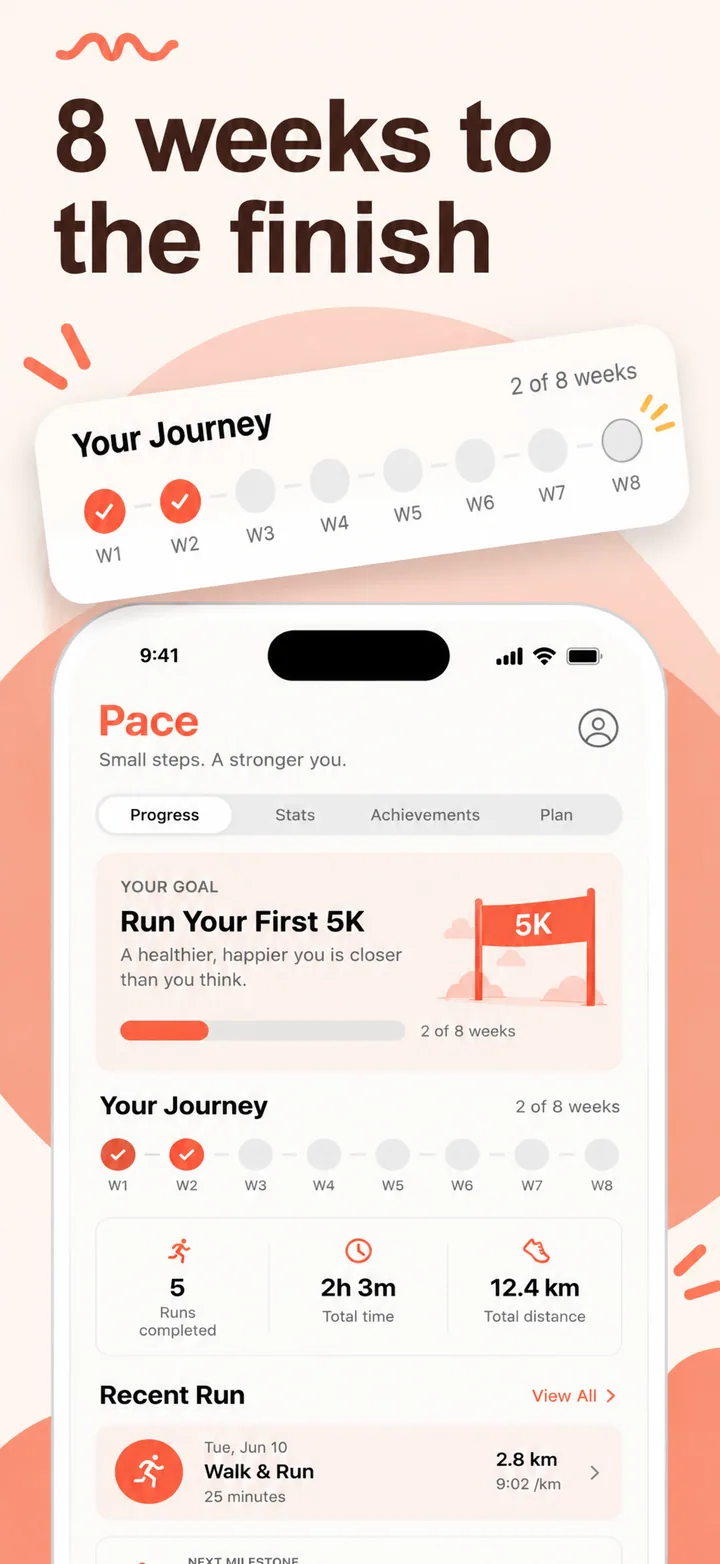
Screenshots for health apps.

Health and wellness apps occupy a uniquely sensitive space on the App Store. Users are not just looking for convenience; they are looking for a partner they can trust with personal, often vulnerable, information.

Last updated June 2026

On this page
  1. Quick answer
  2. What makes health screenshots convert
  3. Best colors for health apps
  4. Common mistakes health apps make
  5. How to create health screenshots with AI

Quick answer

Health app screenshots must communicate trust and a measurable outcome within the first two seconds of viewing. Unlike fitness or gaming categories where energy and excitement drive downloads, health users arrive with a specific concern, whether that is managing a chronic condition, tracking medication, or monitoring a recovery metric. Your first screenshot should show a clean, uncluttered dashboard displaying the exact data point the user cares about most, such as today's glucose reading, remaining pills, or sleep quality score. The visual tone should feel clinical yet approachable, signaling that the app is backed by rigorous design standards while remaining warm enough for daily use. Avoid aggressive sales language, diagnostic promises, or flashy gradients that undermine the sense of medical professionalism users subconsciously demand.

What makes health screenshots convert

The psychology of a health app download is fundamentally different from almost every other category. The user is often experiencing anxiety about a condition, frustration with their current tracking method, or worry about a loved one. This emotional state means your screenshots have one job above all others: reduce friction and build confidence before a single feature is explained.

Your first screenshot must present a value proposition that feels like a diagnosis of the user's problem, not a list of your features. If you are building a medication reminder app, the headline should not say "Smart Pill Tracker." It should say "Never miss a dose again." The difference is subtle but critical. The first frames the app as a product; the second frames it as a solution to a specific, emotionally charged pain point.

The visual psychology of health apps leans heavily on perceived safety and order. Humans instinctively associate symmetry, generous white space, and clear typography with professionalism and competence. This is why the best-performing health screenshots on the App Store often look sparse compared to other categories. A dense screenshot packed with features actually signals complexity, which in health translates to risk. Your layout should favor large text on one side and a device frame showing a calm dashboard on the other. When the phone is positioned on the right, the natural reading flow of left-to-right languages means the user absorbs your promise before they inspect your interface.

Social proof in health requires a softer touch than in fintech or SaaS. Instead of "Trusted by 10,000 hospitals," which can feel exaggerated, effective health screenshots use trust signals like "Data stays on your device" or "HIPAA-aligned security." These phrases speak directly to the privacy fears that dominate health app reviews. If your app has certifications, a small badge or lock icon in the corner of the screenshot can increase conversion by signaling diligence without demanding attention.

Specific layout advice for health screenshots: use a single focal point per frame. Frame one is your promise headline plus a hero metric. Frame two shows the input flow, such as logging a symptom. Frame three shows the insight or trend view. Frame four shows a sharing or caregiver feature. Frame five closes with a security or onboarding promise. This narrative arc mirrors the user's mental journey from problem to reassurance to action.

Best colors for health apps

Color choice in health screenshots is not a matter of brand preference; it is a trust signal that operates below conscious perception. Users make gut-level judgments about whether an app feels medical, wellness-oriented, or consumer-grade based almost entirely on palette within the first half-second.

Soft teal and seafoam green are the most effective primary colors for general health apps. Green is cross-culturally associated with life, growth, and safety in medical contexts. Hospitals and pharmacies have used green signage for decades because it reduces patient anxiety. A soft teal background with white typography feels clean without feeling sterile. It suggests the app is modern and thoughtful, not institutional and cold.

Warm sage and muted olive work exceptionally well for wellness and preventative health categories. These earth tones signal natural, holistic approaches. A sleep tracking app or meditation companion that uses warm sage backgrounds will outperform the same app on a stark white background because the palette pre-frames the experience as gentle and restorative. The psychology here is about association: users looking for natural remedies are primed to respond to colors that evoke plants, calm environments, and organic materials.

Deep navy and slate blue are the strongest choices for clinical or data-heavy health apps, such as telemedicine portals, lab result viewers, or chronic condition managers. Dark blue conveys authority, depth, and technical competence. When paired with crisp white text and subtle accent highlights in cyan or lavender, the result feels like a premium medical device rather than a consumer app. This is particularly important for apps that handle serious conditions; users need to feel they are in capable, professional hands.

Clean ivory and warm white should be your default negative space color, not pure bright white. Pure white feels like a hospital corridor: cold, overwhelming, and exhausting. A slightly warm ivory or cream background signals cleanliness while retaining human warmth. It also reduces eye strain when users view screenshots on OLED screens in dark environments.

Colors to avoid: Bright red is the most dangerous choice for health screenshots because it triggers alarm responses. Unless you are building an emergency alert app, red backgrounds or headlines signal danger, error, or inflammation, all negative associations. Neon colors of any kind, including hot pink, electric green, or saturated yellow, feel toy-like and frivolous. Health users are making decisions about their bodies; they do not want an interface that feels like a social media filter. Finally, avoid cliché purple gradients. While purple can work in meditation apps, the overused violet-to-pink gradient has become so common in wellness marketing that it now signals generic templated design rather than thoughtful branding.

Common mistakes health apps make

Even well-designed health apps routinely sabotage their App Store conversion with screenshots that ignore the emotional reality of their category. Here are the five most costly mistakes specific to health apps.

Mistake one: showing empty or generic dashboards. A symptom checker with no symptoms entered, a meal logger with no meals, or a sleep tracker with no data looks like a blank spreadsheet. It asks the user to imagine value rather than showing it. This is particularly damaging in health because users are often comparison shopping while stressed. An empty state screenshot forces them to do mental work to project themselves into the app, and most will simply scroll away. Fix this by seeding realistic demo data into your screenshots. Show a glucose curve from a real Tuesday, a week of sleep stages, or a medication schedule that looks genuinely useful.

Mistake two: borrowing fitness aesthetics. Health and fitness are adjacent categories but opposite emotional territories. Fitness screenshots thrive on energy, aggression, and bold saturated colors because they are selling motivation. Health screenshots thrive on calm, order, and restraint because they are selling reassurance. If your chronic condition management app uses the same neon orange and black palette as a HIIT timer, you are signaling the wrong emotional promise. Users will subconsciously categorize your app as aggressive rather than supportive. Fix this by auditing your palette against medical device and wellness clinic branding rather than sports apparel.

Mistake three: using diagnostic language. Headlines like "Diagnose your symptoms in seconds" or "AI doctor in your pocket" create two problems simultaneously. First, Apple and Google actively scrutinize health claims and may reject apps that imply medical diagnostic capability without proper regulatory clearance. Second, even if approved, this language raises user skepticism. People do not believe an app can replace a doctor, and promising it makes you sound naive or dishonest. Fix this by using outcome language instead. "Track symptoms and spot patterns" is honest, achievable, and far more trustworthy.

Mistake four: ignoring privacy and security visually. Health apps collect the most sensitive personal data of any category, yet many screenshots never visually acknowledge this. There is no lock icon, no mention of encryption, no local-storage badge. This is a missed conversion opportunity because privacy-conscious users are actively scanning for these signals. Fix this by including a subtle security callout in at least one frame, such as "Your data never leaves your phone" or a small shield icon in the footer of the device mockup.

Mistake five: relying on generic stock photography. Smiling doctors in white coats, diverse families laughing in kitchens, and seniors jogging in parks are so overused in health marketing that users have developed visual immunity to them. Worse, they feel fake. In an era of skepticism toward healthcare advertising, stock photos signal that your app is a marketing shell rather than a real tool. Fix this by leading with UI screenshots and using abstract organic textures or color fields as background elements instead of people photography.

How to create health screenshots with AI

Creating health app screenshots with Nuvex follows a straightforward five-step workflow that ensures you maintain the trust-first aesthetic while saving hours of manual design time.

Step one: Upload your actual app screens to the Nuvex dashboard. Do not use placeholder wireframes. The AI needs to see your real UI, button labels, chart styles, and data density to generate screenshots that look authentic. Include at least one screen showing a populated dashboard, one showing data entry, and one showing a trend or insight view.

Step two: Describe your app in the prompt with health-specific language. Instead of "health app," write "chronic condition tracker for Type 2 diabetes patients with a focus on daily glucose logging and caregiver sharing." The more specific your description, the better the AI can select appropriate palettes, headline formulas, and composition layouts.

Step three: Let the AI generate five frames. Nuvex will automatically bias toward calmer palettes, medical-grade typography, and layouts that prioritize readability and trust signals. The first frame will typically feature an outcome-focused headline, while subsequent frames walk through your core workflows.

Step four: Refine per frame. Click any frame and type specific adjustments. For example, "make frame 3 emphasize data privacy" or "change frame 1 background to soft teal." The AI regenerates only that frame while preserving the set's visual consistency.

Step five: Export your frames in the exact resolutions required by Apple and Google Play. Nuvex handles iPhone 16 Pro Max, iPad Pro, and Android phone dimensions automatically. Download, upload to App Store Connect or Google Play Console, and you are live.

Want health screenshots that convert?

Try Nuvex — free to start, no credit card.

Medical apps

Telemedicine, clinical tools, and patient portals. Read →

Fitness apps

Workout tracking, running, and wellness coaching. Read →

Lifestyle apps

Habits, routines, and personal wellness. Read →